Mega OTT Reseller Panel: Setup, Credits and Top-Ups Explained
Understand panel access, subscription credits and top-ups. Includes our package comparison, a worked credit example and a checklist before your first activation.
What you actually get with a reseller panel
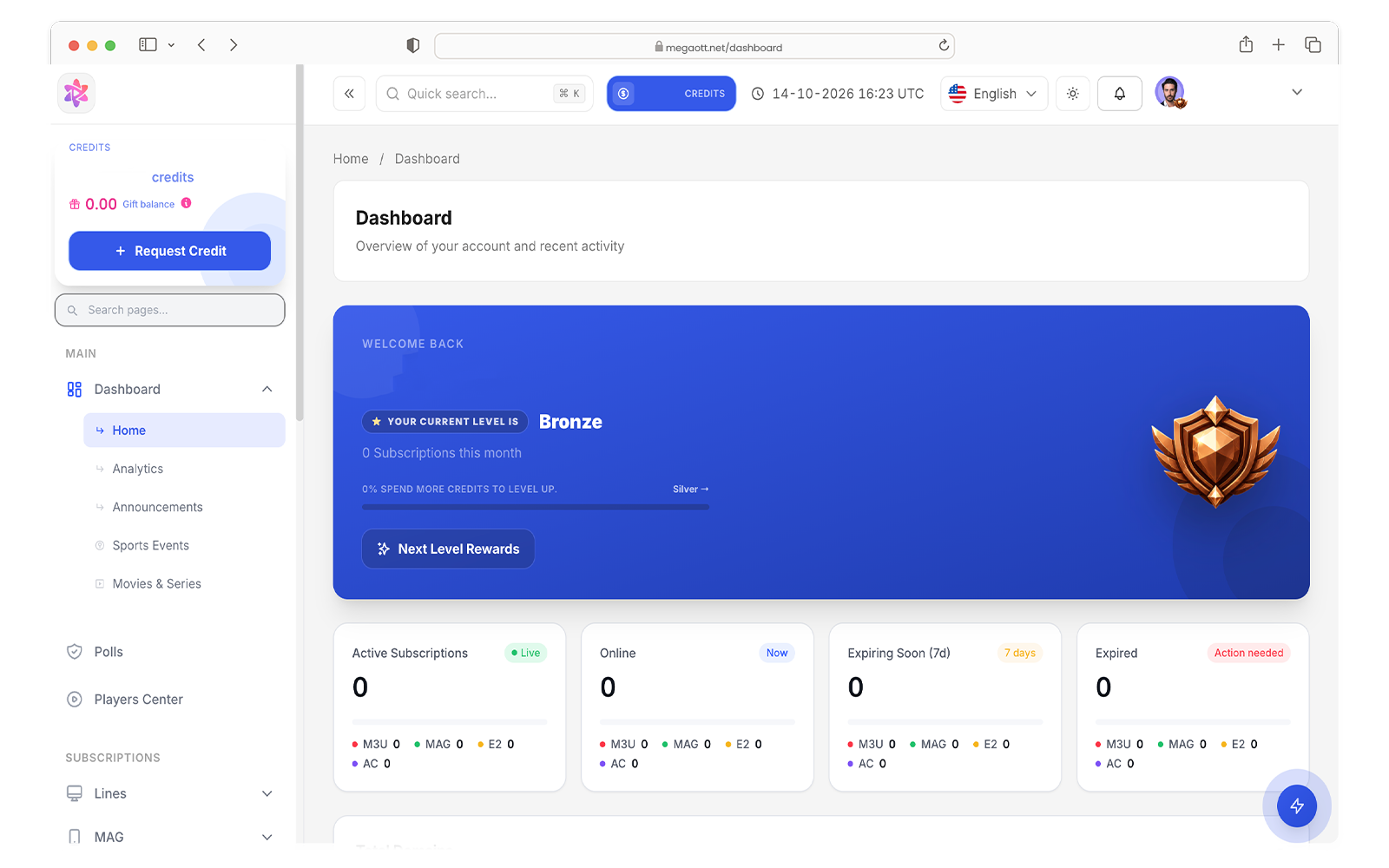
A Mega OTT reseller panel is the management interface used to administer customer subscriptions and the credit balance available to your account. Before ordering, separate three things: the panel login, the credits used for activations, and the playback credentials for an individual customer line. They have different purposes.
A panel is not a television player. Its login should not be entered into a viewing app, and you should not share the administrator password with a customer. If you only need playback on one device, ask whether an individual subscription is more appropriate than a reseller account.
This distinction matters in community discussions. An indexed Reddit guide titled Mega Reseller Panel Procedure separates initial account delivery from later top-ups. That is a useful question to ask any seller; its historical marketplace instructions are not a current specification for this website.
New panel access or an existing-account top-up?
Start by stating which of these two outcomes you need:
- New access: you need a management account and confirmation of the credits included in your order.
- Top-up: you already have a panel and want credits added to that particular account.
For an existing account, ask the seller to confirm eligibility before payment. Do not assume that matching MegaOTT branding means every seller can recharge every panel. A logo or a familiar-looking dashboard alone does not establish the origin of an account.
Request the login address through your established seller contact and bookmark it after verification. Use a unique administrator password. If you receive unexpected instructions to change domains or disclose a password, confirm them through that same trusted contact first.
How Mega OTT credits work on our listed packages
The following activation amounts are the credit model supplied for megaott-panel.com. Confirm the account and connection configuration before activation; do not treat this table as a specification for every seller using the Mega OTT name.
| Subscription duration | Listed credit use |
|---|---|
| 1 month | 0.1 credit |
| 3 months | 0.3 credit |
| 6 months | 0.6 credit |
| 1 year | 1 credit |
Notice that the annual allocation is not simply twelve monthly allocations: twelve times 0.1 is 1.2 credits, while the listed one-year option uses 1 credit. Check the duration selected in the panel before confirming a transaction.
Four annual activations, five six-month activations and ten one-month activations require (4 × 1) + (5 × 0.6) + (10 × 0.1) = 8 credits. Starting with 10 credits would leave 2, assuming the listed rates apply and there are no additional deductions.
Use our credit planner to compare a different activation mix. This is an allocation calculation, not a promise about unused-credit expiry, future prices or the lifetime of the service.
Compare the package cost before buying more credits
| Package | Listed price | Price per credit |
|---|---|---|
| 10 credits | €90 | €9.00 |
| 50 credits | €400 | €8.00 |
| 100 credits | €750 | €7.50 |
These are this website's listed packages at publication. Check the current Mega OTT panel pricing and confirm the payable total before ordering. The lower unit price of a larger package comes with a higher upfront purchase.
In the eight-credit example, allocating credits from the €90 package represents €72 of that package's value. You still purchase the full €90 package; €72 is not a separate offer. Nor is it net profit: customer support, payment costs and any other operating expenses have not been deducted.
A first-activation checklist
- Confirm that you received the correct management account and that the displayed balance matches the order.
- Review the illustrated panel walkthrough to identify the dashboard and customer-line controls. Labels may differ between account versions.
- Confirm duration, permitted simultaneous connections and any account restrictions with your seller.
- Review the pending activation and displayed deduction before submitting. Do not create repeated paid lines to troubleshoot a player.
- Keep a private record of the line reference, activation date, expiry and credit deduction.
- Test the customer's authorized playback setup and document any issue before adding more accounts.
Access credentials and playlist URLs can contain secrets. Mask them in screenshots and keep administrator credentials separate from customer support records.
Questions to settle before a top-up
Ask whether your exact account can be topped up, what the minimum order is, whether unused credits expire, and which conditions apply to activation errors, renewals and refunds. Those policies cannot be inferred from the number of credits in a package.
Does one credit mean unlimited devices?
No device allowance is established by the duration table alone. Confirm the allowed simultaneous connections and any additional credit requirement for your account.
Can I transfer an existing panel to another seller?
Do not assume so. Request account-specific confirmation before buying credits elsewhere; a new login and an existing-account refill are different deliverables.
What if a line exists but does not play?
First check account status and the supplied playback details. Then follow our Mega OTT buffering and black-screen checklist rather than immediately creating another line.
Sources and editorial notes
Researched on 16 October 2026. Community discussions identify questions worth answering; they do not establish current service specifications. General troubleshooting steps are editorial suggestions, not results from a controlled Mega OTT benchmark.
Need an account-specific answer?
Tell us what you need to check before your next step. Include your device or package question so we can help you clarify the details.